Today we released a new version of Excel Price Feed. To update your Add-in, please follow the instructions in the User Guide.
This release includes the following changes:
Earnings Estimates: New formulas
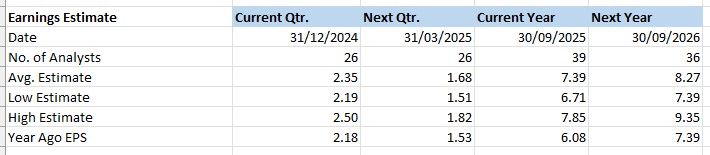
We have added the following new formulas:
- EPF.Yahoo.Earnings.Estimate.NoAnalysts.Annual
- EPF.Yahoo.Earnings.Estimate.NoAnalysts.Quarter
- EPF.Yahoo.Earnings.Estimate.Average.Annual
- EPF.Yahoo.Earnings.Estimate.Average.Quarter
- EPF.Yahoo.Earnings.Estimate.High.Annual
- EPF.Yahoo.Earnings.Estimate.High.Quarter
- EPF.Yahoo.Earnings.Estimate.Low.Annual
- EPF.Yahoo.Earnings.Estimate.Low.Quarter
For example, this formula retrieves the number of analysts providing “next quarter” earnings estimates for Apple stock:
=EPF.Yahoo.Earnings.Estimate.NoAnalysts.Quarter("AAPL",0)For more details please see the Excel Price Feed User Guide.
Historical Download: New Option
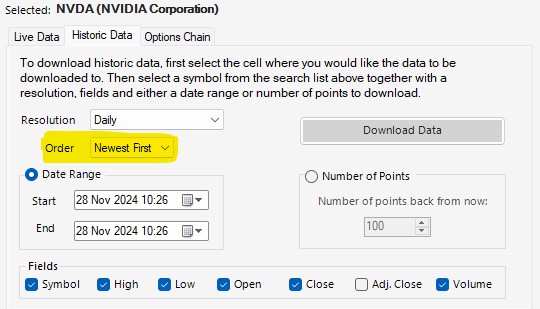
We have added an “Order” by option on the Yahoo Finance historical data download screen:
New Historic Lookback formulas
We have added 3 new lookback formulas for historical data, and all 3 include a pre-post market option:
- EPF.Yahoo.Historic1MinuteLookback
- EPF.Yahoo.Historic5MinuteLookback
- EPF.Yahoo.Historic1HourLookback
For example, to retrieve 200 x 1 minute periods including pre-post market data, you can now use this formula:
=EPF.Yahoo.Historic1MinuteLookback("AAPL",200,"DESC",1,1)
For more details please see the Excel Price Feed User Guide.
Bug Fixes
Task Pane: fixed text colour.
 The Excel Price Feed Blog