
Pulling a full option chain into Excel usually means either copy/pasting data from a broker platform or stitching Excel formulas together one contract and field at a time.
Excel Price Feed’s new Option Chains tool for Interactive Brokers does that work for you:
- Select an underlying: stock, ETF etc.
- Choose an expiry date and strikes.
- Choose only the fields you want to see: option price, delta, gamma, etc.
- Insert a live, streaming options chain into your spreadsheet.
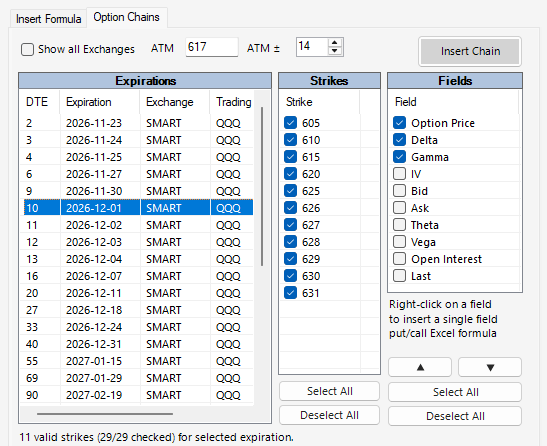
Excel Price Feed validates strike prices with Interactive Brokers so you only see strikes that actually exist for that expiry. And because these are streaming formulas, the values update live while you are connected to Interactive Brokers.
You can build a working chain for an expiry in seconds instead of typing contract details into dozens of cells!
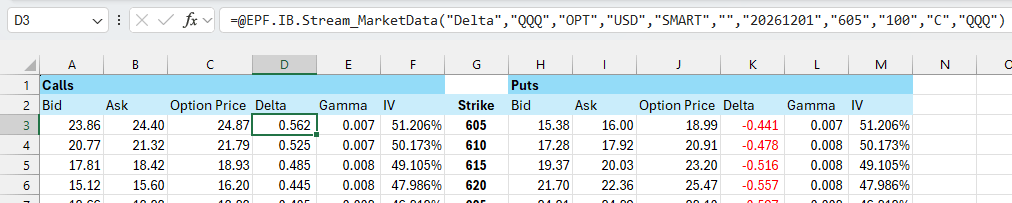
For example, here you can see the actual live streaming formula in cell G3, which has been inserted using the tool:
If you already use Excel Price Feed with Interactive Brokers for streaming prices, the Option Chains Tool is the fastest way to turn that connection into a live options worksheet.
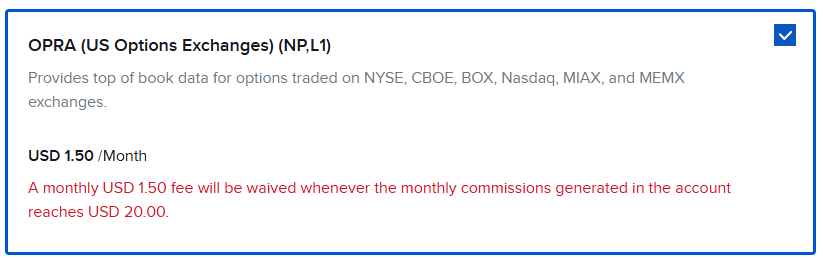
You can stream live OPRA option prices by just adding a $1.50 per month market data subscription to your Interactive Brokers account:
For a full walkthrough, check out our User Guide: https://www.excelpricefeed.com/userguide/interactive-brokers/excel-formulas-option-chains
We hope you find this useful!

