There are lies, damned lies and statistics. There are also charts that are published to mislead or to simply reinforce a point of view that’s flimsy at best or just plain wrong.
These charts are known as “chart crimes” and one appeared all over social media last month. Usually I would just make a comment and move on but this one received over 2 million views and deserves further investigation.
It was a chart comparing the growth of the Nasdaq over two periods: the dot com bubble and the current AI “bubble”. The conclusion being that we are on the same upward trajectory and all things being equal are due a major crash anytime soon.
Aside from the obvious lack of timescale on the x axis and disparity in y axis scaling, does this chart bear any resemblance to reality?
Let’s build our own using Excel Price Feed to retrieve historical market data and produce an Excel chart based on the actual data.
For the Dot com bubble period we will use 1996 to 2002 and for present day we will look at data from Q4 2022 (when ChatGPT was released) to now.
To retrieve the data we will use the Excel Price Feed HistoricDatePeriod formula. Here is an example of how to retrieve monthly data for the NASDAQ Composite Index:
=EPF.Yahoo.HistoricDatePeriod("^IXIC","MONTHLY","1 Sep 2022","1 Oct 2025","ASC",1)
We will base each time series to 1 so we are comparing like-for-like. To do this we simply divide each point by the initial starting point.
We can now plot this data in Excel; the blue line is the dot com bubble, and the orange line is the past 3 years:
Not nearly as dramatic, the trajectory is similar but we are barely halfway towards the dot-com crash equivalent peak. So if the past is an indicator of the future then we should expect the market to double again from here and crash in about a year. But as they say, the past is not always a predictor of the future…
What about individual stocks?
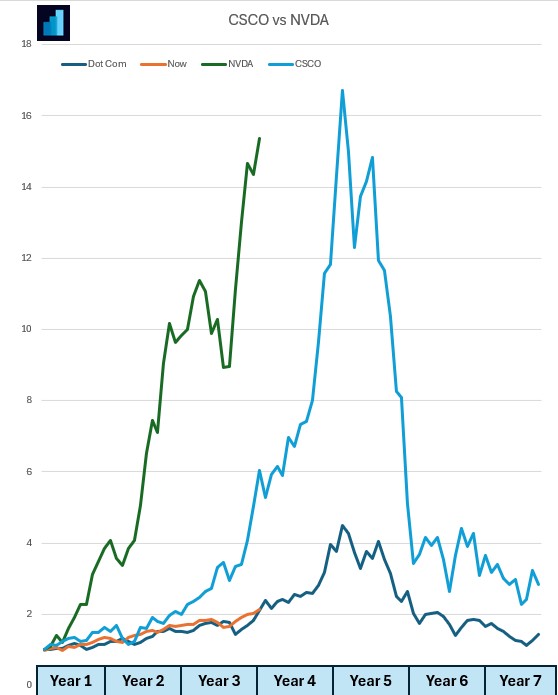
Let’s look at one from the dot com bubble: Cisco (light blue) and one from now: Nvidia (green).
Nvidia has climbed at a much steeper rate than Cisco. Again, similar trajectory and timescales:
If you want to build financial charts like this yourself check out Excel Price Feed today and try it free for 10 days: https://www.excelpricefeed.com/
Today we released a new version of Excel Price Feed. To update your Add-in, please follow the instructions in the User Guide.
In this release, we plugged in any gaps in formulas which were missing the Quarterly and Trailing 12 Months equivalent. The gaps were in the Balance Sheet, Income Statement and Cash Flow groups of formulas.
We also added some additional formulas for retrieving Quarterly figures, which all take as inputs a stock ticker and a quarter. Yahoo doesn’t make available equivalent TTM formulas.
Lastly, we added quite a few additional Quarterly and TTM formulas for Cash Flow. Along with the formulas for Free Cash flow (added in the previous version) below are all the Cash Flow formulas in the system.
Here is an example of the new formulas used in a sheet. This dataset is for the MSFT ticker.
Again the Quarterly formulas take a input a ticker and a reporting quarter and the Trailing 12 Month (TTM) Formulas take as input just a stock ticker. Examples:




 The Excel Price Feed Blog